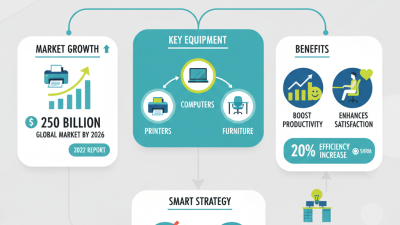
Buying office products across borders is not simply a matter of choosing attractive items. A reliable product must survive shipping, fit local work habits, and meet practical workplace needs. A compact label printer, for example, should support regional power standards, clear software instructions, and easily available replacement labels. A desk chair should offer adjustable lumbar support, durable fabric, and a warranty that remains useful after delivery.
Tom Stemberg, founder of Staples, built his business around a practical promise: “We make it easy for people to buy office products.” That idea still matters for global buyers, but convenience now requires deeper evaluation. Product specifications, supplier experience, packaging quality, delivery reliability, and after-sales support all influence the real purchasing cost. The cheapest item may become expensive when parts are unavailable or returns cross borders.
This guide examines 10 best office products for global buyers, including essential technology, storage tools, ergonomic equipment, and everyday supplies. Each selection is considered through a buyer’s lens: usability, durability, compatibility, and value over time. Some recommendations will suit large companies. Others may work better for remote teams or smaller offices.
There is no perfect universal list. Markets differ. Preferences change. Even a highly rated product can disappoint in a different workspace. That limitation deserves attention, not concealment. Careful buyers should verify current specifications, certifications, warranty terms, and local availability before ordering. Small details often decide whether an office product becomes a dependable tool or an expensive mistake.

Choosing office products for global markets requires more than comparing prices. A desk lamp, filing cabinet, or ergonomic chair must suit different workplaces, users, and regulations. Check dimensions carefully. A chair that fits one office may feel cramped elsewhere. Measure desks, doorways, and storage areas before ordering.
Durability matters. Ask suppliers about material thickness, load limits, product testing, and expected service life. Request current compliance documents for electrical products and verify them with qualified local professionals. Packaging also deserves attention. Reinforced corners, moisture protection, and clear assembly instructions can prevent costly damage during long transport. Small details matter.
I once treated a low unit price as a smart decision. It was not. Replacement parts were unavailable, and the shipment created unnecessary waste. Global buyers should compare total cost, including freight, duties, maintenance, returns, and staff time. Confirm minimum order quantities and realistic lead times in writing. Accessibility should be considered too. Adjustable features, readable labels, and easy-grip controls can support more users. However, no checklist is perfect. Test samples with actual employees before placing a large order. Their feedback may expose noise, awkward controls, or uncomfortable materials that a product sheet hides.
For global buyers, a productive workspace starts with practical essentials, not decoration. A height-adjustable desk supports sitting and standing during long tasks. An ergonomic chair should offer adjustable lumbar support, seat depth, and armrests. A monitor arm can place the screen near eye level, reducing awkward neck angles. Add a compact keyboard, responsive mouse, and stable footrest. Small adjustments matter.
The 2023 Microsoft Work Trend Index reported that 68% of people lacked uninterrupted focus time. A desk lamp with adjustable brightness can reduce screen glare during concentrated work. ENERGY STAR reports that certified LED bulbs use at least 75% less energy than incandescent lighting and last much longer. Buyers should also consider a surge-protected power strip, cable tray, and USB charging hub. These products keep cables away from feet and make shared desks easier to reset.
I prefer tools that are easy to adjust. Fixed designs often look neat but fit fewer bodies. A reusable notebook, document stand, and small timer can support planning without adding much clutter. The WHO and ILO estimated that long working hours caused 745,000 deaths from stroke and heart disease in 2016. That figure does not prove a desk can solve health risks. It does show why movement and breaks deserve space in workspace planning. I still leave too many cables visible sometimes. Perfect organization is unrealistic. Flexible products are usually more useful than perfect-looking ones.
10 Best Office Products for Global Buyers
International offices need more than attractive desks and fast computers. They need tools that work across languages, currencies, time zones, and electrical systems. The ten most useful choices include adjustable desks, ergonomic chairs, compact monitors, document scanners, wireless keyboards, video meeting cameras, encrypted storage devices, label printers, cable organizers, and task management software. These products support comfort, communication, secure records, and clearer workflows. A bilingual keyboard can save time for multilingual teams. A scanner with automatic paper feeding helps convert signed documents quickly. Modular cable trays also make relocation easier.
Tips: Check voltage, plug compatibility, warranty coverage, and local service options before buying. Confirm that software supports regional languages and data protection requirements. Test screen brightness in the actual office, not only in a showroom. Small details matter.
From my experience evaluating office setups, reliability often matters more than advanced features. A camera with stable audio is more valuable than one with unnecessary effects. Storage devices should offer access controls and routine backup options. For shared workspaces, label printers and color-coded organizers reduce misplaced files and equipment. However, product specifications can be misleading. A lightweight monitor may be easy to ship but fragile during repeated moves. I once underestimated adapter availability, and the installation stalled for two days. Global purchasing requires practical checks, not assumptions.
| Product Category | Primary Office Function | Typical Purchase Price (USD) | Key Specifications | International Buying Considerations | Best For | Sustainability and Maintenance |
|---|---|---|---|---|---|---|
| Business Laptop | Mobile computing, document creation, video meetings and cloud applications | US$650–US$1,800 | 13–16 inch display 8–32 GB RAM 256 GB–1 TB SSD 8+ hour battery target | Check keyboard layout, operating-system language support, local warranty coverage, repair availability and USB-C charging compatibility. | Remote employees, consultants and international project teams | Choose replaceable batteries or storage where possible; extend service life with memory and storage upgrades. |
| USB-C Docking Station | Connects one laptop to monitors, wired networks, storage and office peripherals | US$60–US$300 | 65–100 W power delivery HDMI or DisplayPort USB-A and USB-C Gigabit Ethernet | Confirm laptop compatibility, video-output standards, power requirements and plug or power-adapter options for the destination country. | Hot desks, hybrid offices and shared workstations | Use one dock for multiple compatible devices to reduce cable and accessory duplication. |
| LED Monitor | Expands workspace for spreadsheets, design work and multitasking | US$120–US$600 | 24–32 inch size Full HD to 4K 60–100 Hz refresh rate Height adjustment preferred | Verify regional power certification, input ports, language-neutral menus, pixel policy and availability of local replacement parts. | Finance teams, analysts, designers and customer-support staff | LED displays generally use less energy than older display technologies; select sleep-mode and automatic brightness features. |
| Wireless Keyboard and Mouse Set | Improves desk flexibility and reduces cable clutter | US$25–US$180 | Bluetooth or 2.4 GHz wireless Multi-device support Rechargeable or replaceable batteries Ergonomic options | Choose the correct keyboard language and layout, confirm wireless-frequency approvals and check compatibility with local devices. | Flexible workstations and multilingual teams | Rechargeable models can reduce disposable battery use; select products with replaceable keycaps or serviceable parts. |
| All-in-One Document Printer | Printing, scanning, copying and occasional document distribution | US$150–US$700 | Print, scan and copy Automatic duplexing 25–40 pages per minute Network connectivity | Check voltage and plug requirements, consumable availability, regional service support, paper-size compatibility and data-security controls. | Small offices, administrative teams and document-heavy departments | Automatic double-sided printing reduces paper use; compare total cost per page rather than purchase price alone. |
| Video-Conferencing Camera and Speakerphone | Enables remote meetings, training sessions and international collaboration | US$80–US$1,200 | 1080p or 4K camera Wide-angle lens Echo cancellation USB or network connection | Test compatibility with the preferred meeting platform, confirm multilingual software support and review privacy features such as lens shutters. | Distributed teams, sales groups and virtual classrooms | Select firmware-update support and modular components; use automatic power-saving modes when not in meetings. |
| Network Attached Storage System | Centralized file storage, backup and controlled internal sharing | US$250–US$1,500, excluding storage drives | 2–8 drive bays RAID support Gigabit or faster Ethernet Backup scheduling | Review data-residency rules, encryption capabilities, remote-access security, local technical support and drive compatibility. | Small businesses managing shared files and backups | Expandable drive bays can extend product life; RAID improves availability but is not a replacement for independent backups. |
| Document Scanner | Converts paper records into searchable digital files | US$250–US$1,200 | Duplex scanning 30–80 pages per minute Automatic document feeder Optical character recognition | Confirm support for local paper sizes, multilingual OCR, document-security requirements, driver compatibility and regional power standards. | Legal, accounting, logistics and public-administration workflows | Digital archiving can reduce paper storage; choose replaceable rollers and regularly clean the feeder to prevent waste and downtime. |
| Ergonomic Office Chair | Provides posture support during extended desk work | US$180–US$1,200 | Adjustable seat height Lumbar support Tilt control Weight capacity commonly 100–150 kg | Check seat dimensions, user weight range, assembly instructions, local safety standards, shipping volume and replacement-part availability. | Full-time office workers and shared workspaces | Prioritize durable frames, washable upholstery and replaceable casters or armrests to extend usable life. |
| Modular Cable-Management Kit | Organizes power, data and charging cables for safer work areas | US$15–US$120 | Cable trays Hook-and-loop ties Desk grommets Adhesive or screw mounting | Match mounting hardware to desk materials, confirm cable diameters and select reusable components suitable for local office layouts. | Open-plan offices, hot desks and home-office setups | Reusable ties and modular parts create less waste than disposable plastic clips; label cables to simplify future reconfiguration. |
Pricing note: Price ranges are indicative international-market estimates in U.S. dollars and can vary by configuration, taxes, shipping, exchange rates, warranty terms and local distribution.
10 Best Office Products for Global Buyers
Comparing ten office products starts with the workday, not the catalogue: laptops, monitors, docks, keyboards, mice, headsets, webcams, printers, scanners, and ergonomic chairs. Quality means stable hinges, readable displays, quiet keys, and warranties with clear service terms. A dock should support the required display resolution and charging standard. Check plug types, voltage ranges, language settings, and operating-system compatibility before ordering. “Universal” is often too vague.
Cost includes freight, customs handling, replacement parts, and energy use. The 2024 Global E-waste Monitor reported 62 million tonnes of electronic waste in 2022, while only 22.3% was formally recycled. That makes repairable printers, replaceable batteries, and modular docks more than attractive features. ENERGY STAR guidance also shows that efficient office equipment can reduce electricity consumption substantially compared with conventional models. Still, advertised savings depend on actual usage.
Sustainability claims need evidence. Request recycled-content percentages, repair instructions, product environmental data, and recognized certification details. The International Energy Agency notes that electricity demand keeps rising across digital equipment and services. A low-cost monitor may consume more power for years. The cheapest choice can fail.
A practical comparison sheet should score five areas: build quality, total cost, compatibility, energy performance, and repairability. Leave space for uncertainty. Supplier data can be incomplete, and recycled materials may affect durability. That trade-off deserves review, not marketing language.
10 Best Office Products for Global Buyers
Global purchasing starts with a practical product shortlist: ergonomic chairs, adjustable desks, monitors, docking stations, keyboards, mice, task lights, filing cabinets, whiteboards, and document shredders. Each item needs more than an attractive price. Buyers should confirm materials, dimensions, packaging strength, and expected service life. A chair may fit one market but fail another because of different user sizes. Details matter.
Shipping conditions can change the real cost quickly. Check carton measurements, pallet limits, delivery terms, and import documentation before placing a large order. Electrical products require special attention. Confirm voltage, plug type, frequency, labeling, and applicable safety testing for the destination country. Ask suppliers for current technical files, test reports, manuals, and material declarations. Do not rely on a copied certificate. Verify the issuing body and product model.
After-sales support also affects purchasing quality. Request spare wheels, desk controls, cables, filters, or replacement panels when relevant. Define warranty periods, response times, repair procedures, and responsibility for damaged deliveries. Keep photos from inspection and delivery records. In one sourcing project, I underestimated replacement-part storage and paid for avoidable delays. That mistake changed our later planning. A small trial shipment can reveal weak packaging, unclear instructions, or inconsistent assembly. Test one unit. Then review the evidence before expanding the order.
Global Purchasing, Shipping, Compliance, and After-Sales Considerations
The planning score combines four practical purchasing factors: international shipping simplicity, regulatory and documentation requirements, product durability, and after-sales service complexity. Higher scores indicate categories that are generally easier to source and manage across multiple markets. This is a comparative procurement benchmark, not market-share or vendor-performance data.
Fast, modern and
At your fingertips
Tremain´s Blaze fast program
Was created for customers
That need product FAST!
Download catalog
Blaze Catalog